
Balance mismatch
Prevent gaps between policy, opening balance, accrued entitlement, availed leave and payroll.
Configure leave categories, cycles, accruals, holidays, requests, manager approvals, balances and their authorised attendance and payroll impact.
Connect policy setup, employee requests, approval queues, attendance impact and payroll-ready reporting.
Prevent gaps between policy, opening balance, accrued entitlement, availed leave and payroll.
Keep pending leave, permission and on-duty actions visible before attendance finalisation.
Give managers team-calendar and holiday visibility before approving overlapping requests.
Reduce payable-day and salary errors caused by unapproved leave or missing adjustments.
Start with direct entitlement rules or configure multi-condition policies for different employee groups.
Configure eligibility, credits, approvals, validity and payroll treatment without separating leave from attendance.
Set entitlement slabs using completed months or years of service, joining or confirmation date, milestone revisions and pro-rata rules.
Configure Comp-Off rules, approved OT-hour slabs, half-day or full-day credit, approval, validity, expiry and consumption priority.
Control encashment eligibility and limits, calculate using configured salary components and show the approved amount separately in the payslip.
Capture approved work and qualifying overtime.
Apply leave, Comp-Off and service-eligibility controls.
Update leave balance or calculate approved encashment.
Show the encashment amount in the published payslip.
Bring policy administration, employee self service, approval work and period operations into one controlled module.
Leave Category, Leave Cycle Master, Leave Earn Rule, excluded days, accrual, carry-forward and expiry.
Holiday Group, Holiday Master, weekly-off context and employee Holiday Calendar visibility.
Assign approving users and maintain Leave, Permission and On Duty approve or reject queues.
Apply Leave, Permission or On Duty and review balances, status, remarks and request history.
Assign leave categories to staff, import opening balances and support leave year-end processing.
Approved leave, permission, on-duty and Comp-Off data support attendance and payroll readiness.
Employees apply leave, permission or on-duty from ESS with date, duration, reason and remarks.
Send the request to assigned approvers and keep pending actions visible in My Tasks.
Managers decide with remarks while status history remains available for later HR review.
Apply simple or advanced entitlement, service, accrual, carry-forward and expiry rules.
Apply approved leave, holiday, weekly-off, Permission, On Duty and Comp-Off status.
Review operational reports, leave import, year-end processing, encashment and payroll output.
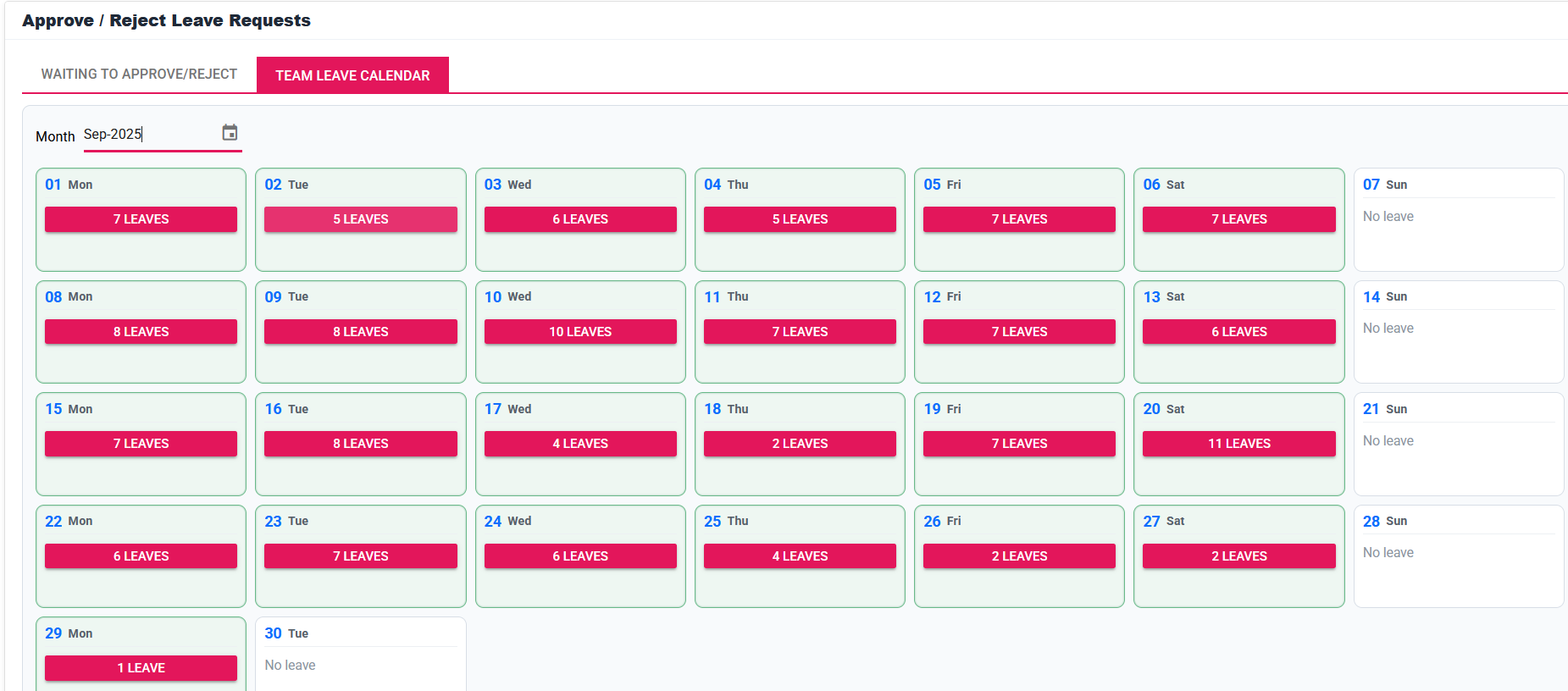
Show managers and employees the actual calendar, self-service request and attendance-review experience.
Review team availability and holiday context before approving leave.
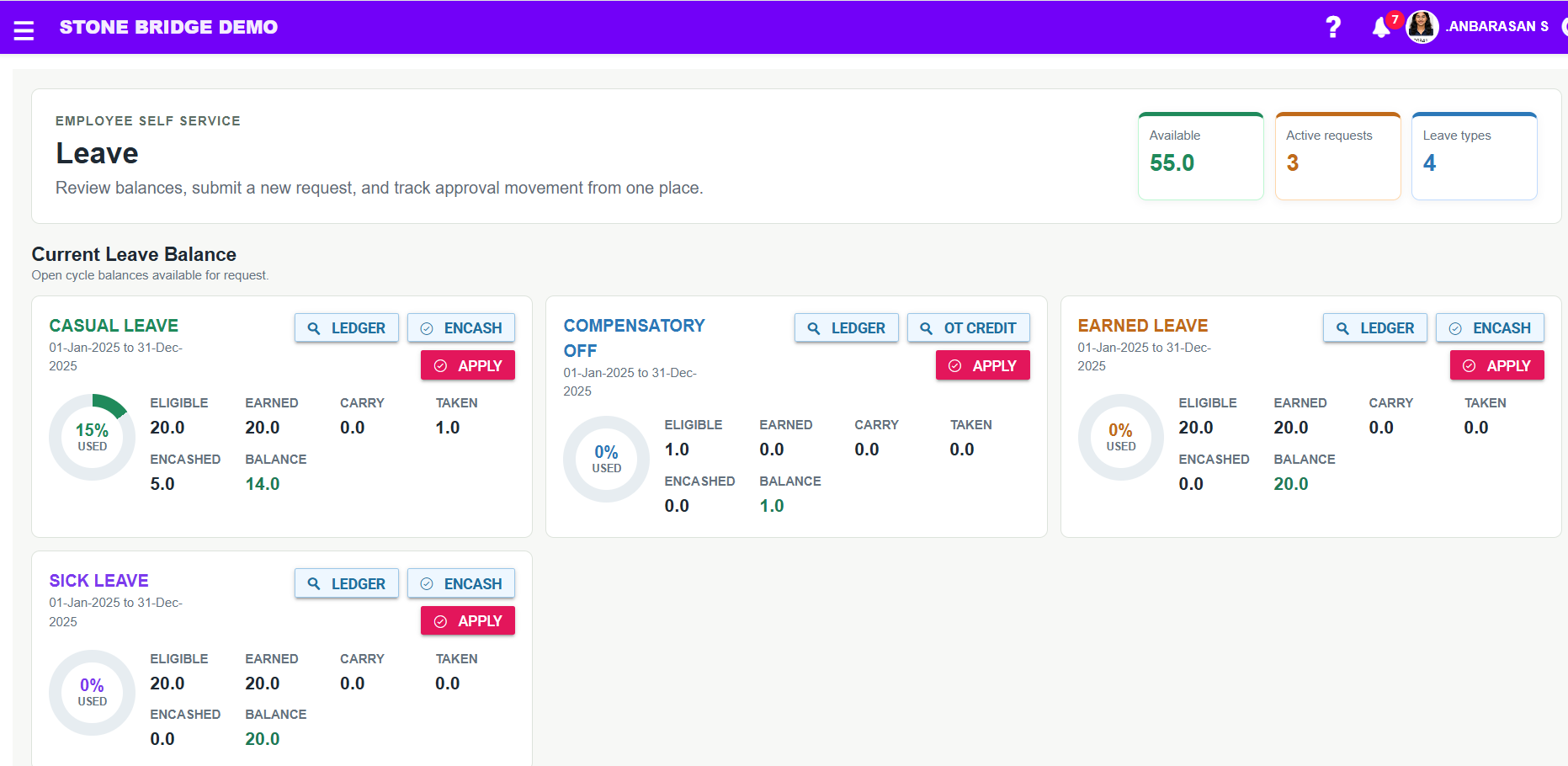
Employees apply leave and follow the configured approval workflow.
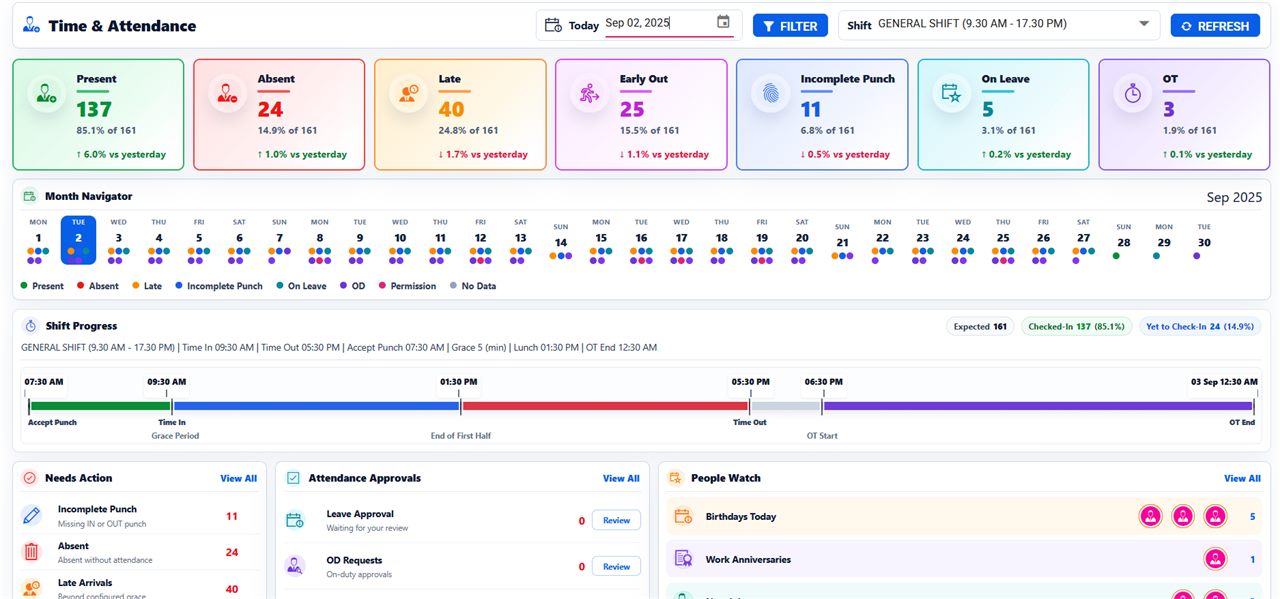
Approved leave and exceptions support attendance review before payroll.
Review team calendars, holidays and overlapping leave before approval.
Track leave, Comp-Off, permission and on-duty requests, remarks and approval history.
Review balances, service eligibility, encashment calculations and payslip output.
Leave types, entitlement, accrual, service eligibility, Comp-Off, encashment and payroll treatment are configured against the customer's approved policy and confirmed applicable requirements.
Leave setup, workflows, employee requests and status reports remain connected to the same configured policy.
Leave Category, Leave Cycle, Simple or Advanced Leave Earn Rule, excluded days and carry-forward controls.
Holiday Group, Holiday Master, shift weekly-off context and Holiday Calendar in ESS.
Comp-Off Rule, OT-to-Comp-Off Rule, credit processing, validity, expiry and consumption.
Eligibility, limits, salary-component calculation, encashment register and payslip visibility.
Assign Leave Category to Staff, selected employee groups, Leave Y.E.P. and Leave Import.
Assign Approving User and route Leave, Permission and On Duty requests.
Leave, Permission and On Duty approve or reject queues with My Tasks visibility.
Apply Leave, Permission and On Duty and review the Holiday Calendar.
Leave, Permission and On Duty status with remarks and request-history visibility.
Managers and HR act through controlled leave, permission and on-duty queues.
Simple or advanced rules and service eligibility keep entitlement structured.
Approved requests reduce attendance correction before payroll.
Team calendars and holiday context help managers plan staffing.
Approved leave and encashment support payable days and clear payslip output.
Discuss payroll, WPS preparation, attendance, leave, EOS and reporting with our implementation team.